$59/month· 14-Day Free Trial
No credit card required · Cancel anytime · Bills your customers in CAD
Live demo — go ahead, scroll & tap it
my.industrybosspro.com
Spinning up your live demo…

The full software you run everything from — route building, crew dispatch, scheduling, billing and more.

Works in Canada · CAD Invoicing Built In

Lawn Mowing Software
Built for the Canadian Season

A Canadian mowing season is a sprint — first cuts around the May long weekend, last cuts and fall cleanups racing the leaves in October, and every rained-out Tuesday in between has to land somewhere. MowBossPro holds your weekly routes together through all of it, and bills your customers in Canadian dollars while it does. The demo above is the real software — go click it.

Start Your 14-Day Free Trial
No credit card required  ·  14-day free trial  ·  from $59/mo after

Most “Demos” Are a Phone Call

Search for mowing software from anywhere in Canada and every demo button wants your name, your number, and a slot on a salesperson's calendar. Ours is the thing at the top of this page — it is already running.

MowBossProTypical mowing software
See the softwareRight nowAfter a scheduled call
Give your phone numberNeverRequired
Bill customers in CADBuilt inWorkarounds, or USD
Credit card for the trialNeverOften
Data in the demoA full companyEmpty, or a slide deck
Crew & customer appsBoth, liveScreenshots
Sales follow-upNoneExpect it

No form stands between you and the demo above. There is nothing to fill in.

Twenty-Some Weeks to Make the Whole Year

When the mowing season opens on the May long weekend and shuts down when the leaves come, there is no slack in the calendar. Every piece of MowBossPro exists to keep those weeks full and paid for.

🇨🇦

Bill in Canadian dollars, natively

Set your country to Canada in Company Info and every invoice, card charge, and Pay Now link bills your customers in CAD through your own Canadian Stripe account. No USD on their statements, no conversion complaints, nothing to configure per customer.

📅

Cut schedules that hold their day

Put a lawn on weekly or bi-weekly and it keeps its route day — the Tuesday yards stay Tuesday yards. Visits generate themselves all season, so your week fills in without you rebuilding it every Sunday night.

🏘️

Neighbourhood route density

Draw a circle around a crescent on the map and see every property, service, and lawn square foot inside it before you commit a truck. Stack whole streets into one trailer drop instead of criss-crossing town.

🌧️

Rain weeks without the phone chaos

When Tuesday washes out, push the day's stops instead of calling forty customers. Reschedule alerts go out automatically, and the cut cycle stays intact underneath — next week is still next week.

🍂

Spring & fall cleanups, same customer

The opening cleanup and the October leaf race live on the same customer and property as the weekly cut — estimate it, schedule it, and invoice it alongside the mowing without duplicate records.

📱

A crew app and a customer app

Your crew gets the day's stop list with gate notes on their phones; your customers get their own app for skip requests, invoices, and payments. Both included, both working in Canada today.

The Tuesday Yards Stay Tuesday Yards

A mowing route only makes money when it holds its shape. MowBossPro pins every recurring lawn to its cycle and its route day, then generates the visits for you week after week — so a season that only runs twenty-some weeks doesn't leak any of them to scheduling drift.

  • Weekly, bi-weekly, monthly, or fully custom cut cycles per property
  • Visits generate automatically and land on the right route day
  • Bi-weekly lawns alternate correctly without a spreadsheet tracking whose week it is
  • Skip a visit for weather or vacation without breaking the cycle
  • See the week's visits before they hit the schedule
  • Renewal reminders so seasonal agreements don't quietly lapse over winter
This Week — Recurring Cuts
Tuesday — Weekly route
32 lawns · holds its day all season
Set
Wednesday — Bi-weekly A
18 lawns · alternates with week B
Set
Thursday — Weekly route
27 lawns · generated automatically
Set
Nothing rebuilt by hand.
The cycle generates the week; you just run it.

Whole Crescents, One Trailer Drop

The most profitable hour in mowing is the one where the trailer never moves. On the MowBossPro map you can draw a circle around any neighbourhood — a crescent, a subdivision, a corridor — and instantly see every property, every service, and the total lawn square footage sitting inside it.

That turns route building into a density decision instead of a guess: see which streets are worth a truck, quote the neighbours around your existing stops, and drop the whole circle onto the dispatch board at once.

  • Circle any area on the map and see every property inside it
  • Total lawn square footage and service counts for the circled area
  • Schedule everything in the circle at once — straight to the dispatch board
  • Drag-and-drop stop ordering so crews mow down the street, not across town
  • Full Google mapping on Canadian streets and postal-code addresses
Circle Selection — One Crescent
11
Properties Inside
1
Trailer Drop
84,600
Lawn Sq Ft
0 km
Driving Between Stops
Drops to the dispatch board with a full route map

When Tuesday Washes Out,
Nobody Has to Work the Phones

Every Canadian mowing company loses days to rain. What it doesn't have to lose is the evening spent calling every customer on the route. In MowBossPro you push the washed-out stops to another day, the reschedule alerts go out on their own, and the recurring cycle underneath doesn't move — next week's cut is still next week's cut.

  • Move a full day of stops without touching each one
  • Automatic reschedule alerts to every affected customer
  • Skip a cut entirely without breaking the cycle
  • The dispatch board shows what got absorbed where
Rained Out — Tuesday
🌧️
Tuesday route — 32 stops
Pushed to Wednesday & Thursday
Moved
💬
Reschedule alerts
Sent to all 32 customers automatically
Sent
🔁
Cut cycles
Unchanged — next week generates as normal
Intact
Zero phone calls made.
The rained-out day gets absorbed, not re-negotiated.

The Season Opens and Closes
on the Same Customer Record

Spring cleanups kick the season off and the October leaf race closes it out — and both belong to the same customers you mow all summer. In MowBossPro a cleanup is just another service on the property: estimate it, drop it on the schedule, and invoice it next to the weekly cut without creating anything twice.

  • Add cleanup services to an existing customer and property in seconds
  • Estimate the cleanup, get one-click acceptance, convert to an invoice
  • Fall cleanups schedule onto the same routes and crews as the mowing
  • Service history keeps cuts and cleanups on one property timeline
  • Fully custom service types — name them the way your operation talks
One Property — Full Season
Spring Cleanup
May · opens the season
Done
Weekly Mowing × 22
May → October · holds its route day
Running
Fall Cleanup
October · racing the leaves
Booked
One customer. One record.
Cuts and cleanups share the property, the history, and the card on file.

Per Cut or Flat Monthly —
Either Way, It Bills in CAD

Set your country to Canada on the Company Info page and MowBossPro bills your customers in Canadian dollars from that moment on — every invoice, every card-on-file charge, every Pay Now link, all through your own Canadian Stripe account. Charge per cut as the season runs, or put steady customers on a flat monthly amount and let the charge run itself.

  • Every customer invoice and card charge in Canadian dollars
  • Your own Canadian Stripe account — your money never routes through us
  • Per-cut invoicing or flat monthly card-on-file billing per customer
  • Pay Now links customers settle from their phone
  • Automated payment follow-ups chase unpaid invoices for you
  • Full payment history — method, date, and reference on every dollar
Invoice #0187 — Billed in CAD
Weekly Mowing — 4 cuts$220.00
Fall Cleanup$140.00
Total$360.00 CAD
Card on File Charged
Pay Now Link
Through your own Canadian Stripe account — customers see plain CAD.
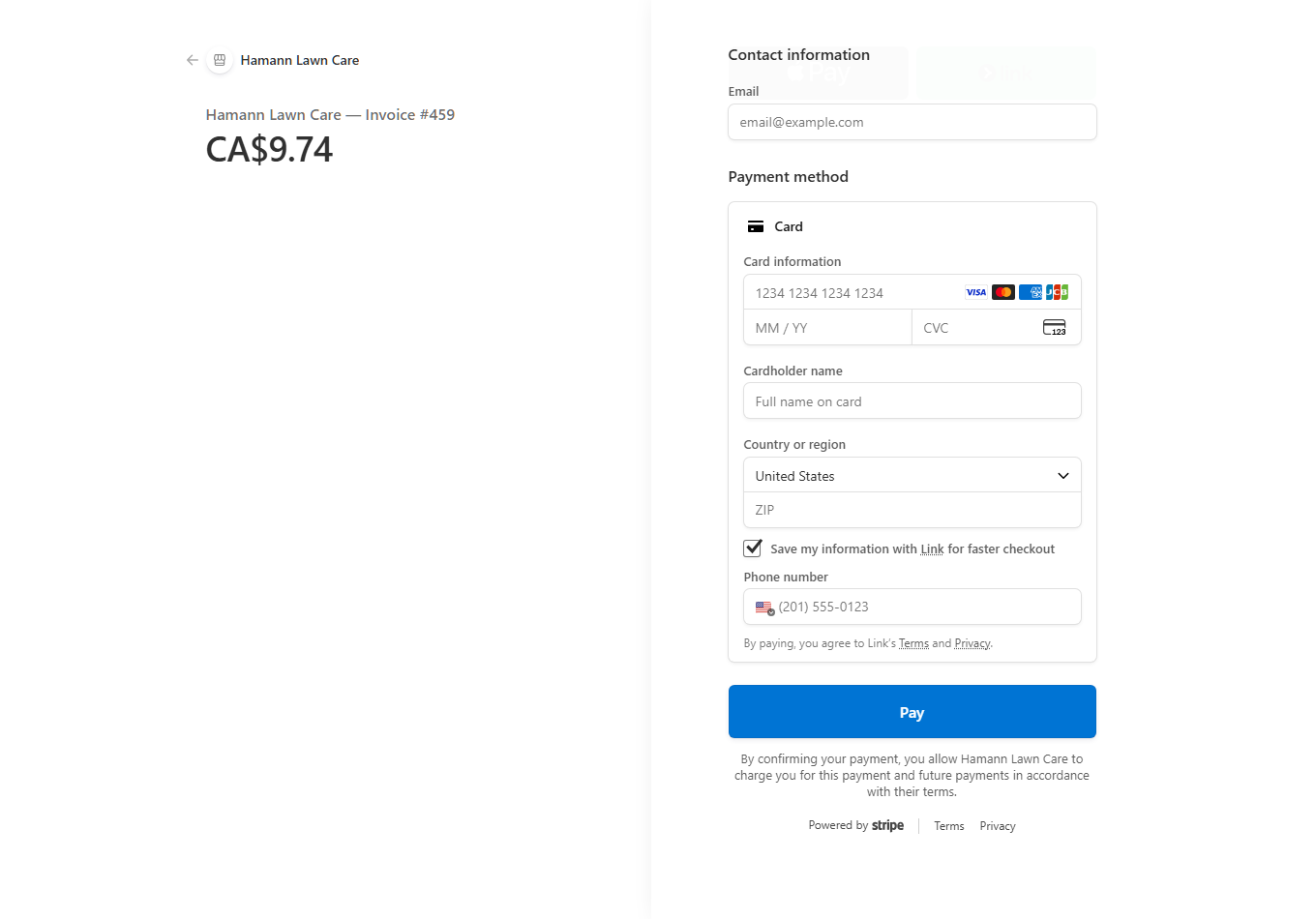
Stripe payment page from MowBossPro showing Hamann Lawn Care — Invoice #459 for CA$9.74, with card fields and a Pay button

A real payment page from the platform — a Canada-set company's customer pays in Canadian dollars. (The founder's own company.) The country selector is Stripe's standard field; customers pick their own country at checkout.

The Day's Stops, the Gate Notes,
and Nothing Else

Your crew doesn't need the office software — they need today. The MowBossPro crew app puts the stop list on their phones in route order, with the property notes and gate details attached to each address, and one big button to mark the yard done and roll to the next one.

  • Today's stop list in route order, per crew
  • Gate notes and property details attached to every stop
  • One tap to mark complete, skip, or add a note
  • What the crew finishes shows up in the office instantly
  • Role-based access — crews see their stops, not your books
  • Try it live in the demo at the top of this page — tap the crew app tab
Crew Phone — Stop 6 of 27
14 Birchwood Cres.
Weekly cut · gate code 4418 · dog in yard
Up Next
18 Birchwood Cres.
Bi-weekly · side gate latch sticks
Queued
22 Birchwood Cres.
Weekly cut · leave clippings bagged
Queued
Mark done. Next stop.
Built for a phone in a truck, not a desk in an office.

Your Customers Get Their Own App —
Skips, Invoices, and Payments Included

Every customer gets a branded app on their phone — no app store, no password to remember. Going to the lake for two weeks? They request the skip themselves instead of leaving a voicemail. And you decide feature by feature what each customer can see.

Request a skip or reschedule a visit without calling the office
See upcoming cuts and full service history for their property
View and pay invoices in CAD from their phone — card on file, one-tap Pay Now
Update their card, contact you, or refer a neighbour
Get alerts their way — email or app notification from day one
You flip any feature on or off per customer with a single switch

Office, Crew, and Customer — One Backend

The picker above the demo at the top of this page swaps between the three apps that make up the system. They share one backend, so a lawn your crew finishes on a crescent in Moncton or Medicine Hat shows up in the office and on the customer's phone at the same moment.

1

The office

Scheduling, the circle-map route builder, estimates, CAD invoicing, and the dispatch board. What you run the business from.

2

The crew app

Today's stop list in route order, gate notes, property details, and one-tap complete or skip.

3

The customer app

What your customers get — visits, skip requests, invoices in CAD, and one-tap payment.

One Flat Price. Every Feature. No Per-User Fees.

The plan is $59 USD a month with everything included — and to be plain about it up front: the subscription itself bills in US dollars and your bank converts, while everything your customers see bills in Canadian dollars. Full detail in the FAQ below.

No contracts. Cancel anytime. No hidden fees — ever.

Straight Answers for Canadian Operators

Does MowBossPro actually work for a Canadian mowing company?

Yes — today, not "coming soon." Customer records, weekly and bi-weekly cut schedules, the route map, estimates, invoicing in Canadian dollars, the crew app, and the customer app all work in Canada right now. You connect your own Canadian Stripe account and your customers are billed in CAD.

Do my customers get billed in Canadian dollars?

Yes. Set your country to Canada on the Company Info page and every invoice, card-on-file charge, and Pay Now link goes out in Canadian dollars automatically, through your own Canadian Stripe account. Your customers see a plain CAD amount — no US dollars, no conversion line on their statement.

Can I bill per cut, or a flat monthly amount?

Both. Invoice each cut as it happens, or set a customer up on flat monthly card-on-file billing and let the charge run itself. Either way it bills in CAD, and spring or fall cleanups can be added to the same customer without setting anything up twice.

What does the subscription itself cost in Canada?

The plan is $59 USD a month with every feature included — no tiers, no per-user fees. The subscription is priced in US dollars, so your card is charged in USD and your bank converts it. We say that plainly because a surprise conversion on your statement is exactly the kind of thing software companies bury.

Does the automated texting work in Canada?

It works, but it is not instant. Sending automated texts in Canada requires registering a Canadian sending number with the carriers, which we set up with you during onboarding — it takes some lead time, not a flipped switch on day one. Email alerts and customer-app notifications work everywhere from your first day.

Is there a free trial?

Yes — 14 days, full access, no credit card required to start. Set your country to Canada during setup and your account bills customers in CAD from the very first invoice.

Do I have to book a demo call first?

No. The demo at the top of this page is the real software connected to a live demo company — office dashboard, crew app, and customer app. Nobody is notified that you looked, and nobody will call you.

The Season Is Short.
The Setup Isn't.

Set your country to Canada, connect your Stripe account, and bill your first customer in CAD before the next cut. 14 days free, every feature, no card up front.

No credit card required  ·  14-day free trial  ·  from $59/mo after